Debugging Linux applications — local and remote over gdbserver
gdbforge is a Vim-inspired GDB terminal UI for user-space programs — on an embedded Linux board or on the host. This guide covers deploy + gdbserver over SSH (:lua remotegdb) and where program stdin/stdout goes. For the kernel or a loadable module, where a breakpoint stops the whole system, see KERNEL_KGDB.md.
Prerequisites
Local debugging needs almost nothing; the remote path needs a little setup on both sides.
| Need | Where | Why |
|---|---|---|
| gdbforge installed | host | install — verify with gdbforge -version |
gdb |
host | the backend. For a remote board of a different architecture, a cross GDB (e.g. aarch64-linux-gnu-gdb), selected with gdbforge -d <gdb> |
Your program built with -g |
host | source-level debugging needs DWARF |
gdbserver on the target |
target | :lua remotegdb runs it over SSH; most Yocto/Buildroot images ship it |
| Key-based SSH to the target | both | every ssh/scp in the script uses -o BatchMode=yes, so password prompts fail. Run ssh-copy-id root@<board> first |
| Matching unstripped binary on the host | host | the host GDB reads symbols locally while the target runs the stripped copy |
GDBFORGE_TERMINAL (optional) |
host | only for the external-terminal I/O mode below |
Quick sanity check before you start:
If that prints a version without asking for a password, the remote path will work.
To your first breakpoint (local program)
- The Code pane opens on your source. Move the cursor to a line and press Space to set a breakpoint.
- Type
:b gdbandrun(orstart, which breaks atmainimmediately). - On the stop,
━━▶marks the program counter and the Call Stack, Threads and Breakpoints panes refresh together. There is no variables pane yet — useprint/info localsin:b gdb. - c continues, n steps over, s steps into, f
finishes the frame. Program output lands in
:b iounless you redirect it below.
For the remote equivalent, jump to Remote board — :lua remotegdb.
Demo — Linux app I/O
Linux app — external terminal print vs the internal IO pane (:b io). Watch on YouTube.
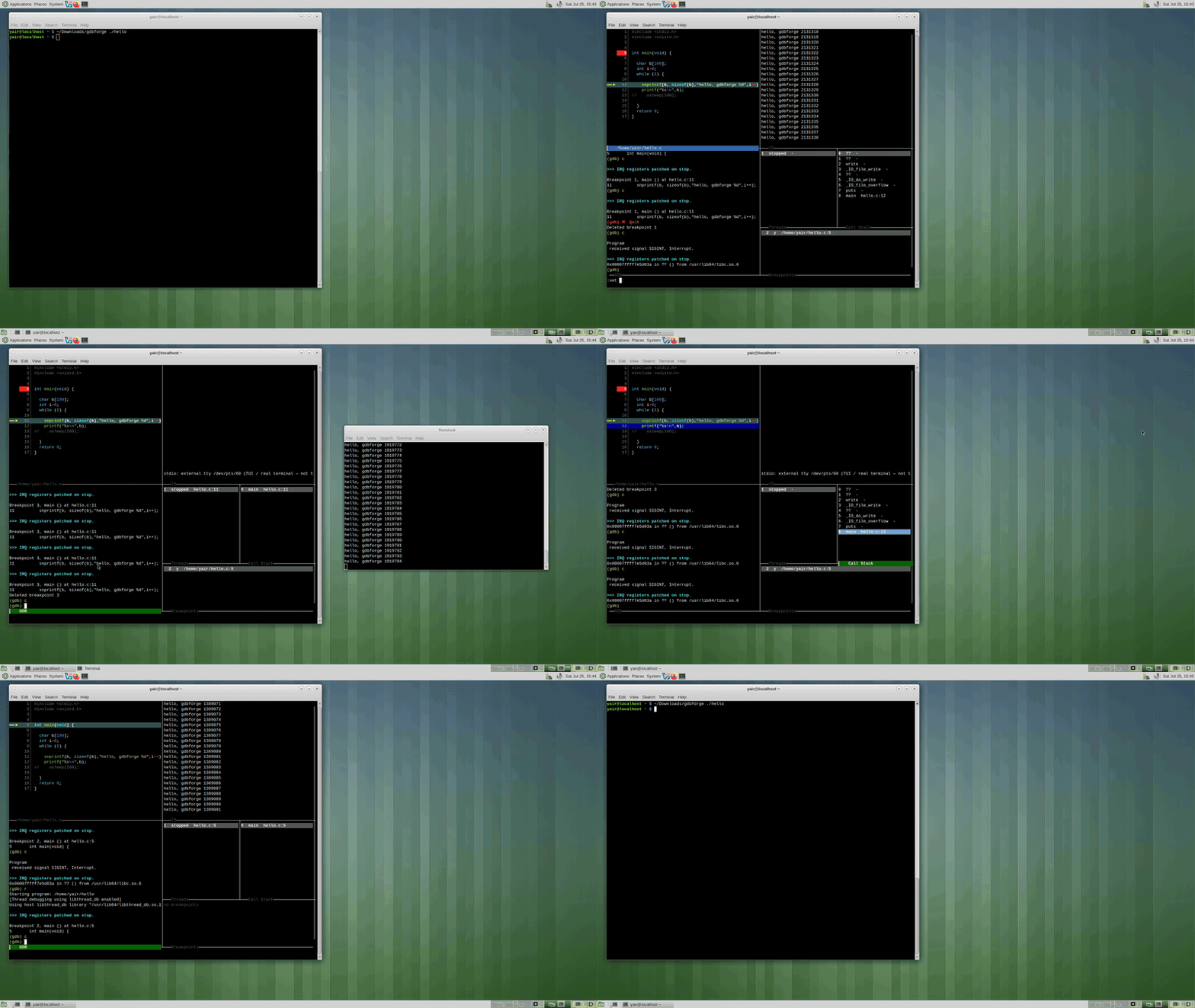
Program I/O — internal vs external
Every debug session has an inferior (your app). Its stdin/stdout can go to three places:
1. Internal IO pane (default)
- Pane:
:b io(alias:b output) inside gdbforge - Best for: line-oriented output, simple
printf, stdin while stopped or running - Setup: none — works out of the box
- Limit: not a full VT100; heavy TUI/curses or flood printing may feel sluggish (Ctrl-C still works)
2. External terminal (host)
- Window: real emulator (
mate-terminal,kitty,xterm, … viaGDBFORGE_TERMINAL) - Best for: full-screen TUI, curses, high-rate stdout
- Commands:
:lua external_tty— open tty, thenfile/runyourself:lua terminal_debug [prog] [run]— tty + optional load/break/run:set inferior-tty— same idea from the GDB console (no Lua):set inferior-tty internal— switch back to:b io- When external,
:b ioshows a note only — type in the other window
3. gdbserver (inferior in gdbserver's tty)
The debugged program runs under gdbserver; its stdio is gdbserver's terminal (local or on the board).
| Script | Target | I/O location |
|---|---|---|
:lua gdbserver_tui [prog] [port] |
Same PC | External terminal running local gdbserver |
:lua remotegdb [app] [host] [port] |
Board | SSH opens terminal; gdbserver on board runs the app |
gdbforge attaches with target remote; breakpoints and stepping stay in gdbforge panes.
flowchart TB
  subgraph internal [Internal IO default]
    App1[your app] --> IO[":b io pane"]
  end
  subgraph external [External terminal]
    App2[your app] --> Term[mate-terminal / kitty]
    Lua1[":lua external_tty"]
    Lua2[":lua terminal_debug"]
    Set[":set inferior-tty"]
  end
  subgraph gdbserver [gdbserver]
    App3[your app on board or host] --> GS[gdbserver process]
    GS --> Term2[external terminal or SSH window]
    GF[gdbforge GDB] -->|target remote| GS
  end
Remote board — :lua remotegdb
Deploy binary, start gdbserver over SSH, attach with target remote.
mkdir -p .gdbforge/lua
cp -r lua/embedded/remotegdb .gdbforge/lua/
export GDBFORGE_REMOTE_HOST=192.168.20.50
export GDBFORGE_TERMINAL=mate-terminal
./bin/gdbforge ./hello
:lua remotegdb
Workflow
- Local app path — arg,
GDBFORGE_REMOTE_APP, or session program - MD5 compare; scp only if remote copy missing or stale
- SSH runs
gdbserver :PORT /tmp/app [args…]in an external terminal wait_port→file+target remote host:PORT
Environment variables
| Variable | Default | Meaning |
|---|---|---|
GDBFORGE_REMOTE_APP |
(empty) | Local binary |
GDBFORGE_REMOTE_APP_ARGS |
(empty) | Inferior argv |
GDBFORGE_REMOTE_HOST |
192.168.20.50 |
Board IP |
GDBFORGE_REMOTE_USER |
root |
SSH user |
GDBFORGE_REMOTE_PORT |
1234 |
gdbserver port |
GDBFORGE_REMOTE_DIR |
/tmp |
Remote install dir |
GDBFORGE_TERMINAL |
auto | Terminal for ssh/gdbserver window |
Local host — gdbserver or direct GDB
:lua |
Purpose |
|---|---|
gdbserver_tui |
gdbserver in external terminal + target remote localhost:PORT |
terminal_debug |
Direct GDB + external tty (+ optional file/break/run) |
external_tty |
External tty only |
remotegdb_log |
Tail /tmp/gdbserver.log on board via SSH |
Script install paths
All under lua/embedded/:
cp -r lua/embedded/remotegdb .gdbforge/lua/
cp -r lua/embedded/terminal_debug .gdbforge/lua/
cp -r lua/embedded/external_tty .gdbforge/lua/
cp -r lua/embedded/gdbserver_tui .gdbforge/lua/
Kernel debug (not user-space): KERNEL_KGDB.md. PTY details: PTY_ARCHITECTURE.md.
See also: Lua catalog — embedded · User Guide — Lua