Debugging the Linux kernel with kgdb — one UART, two UARTs or Ethernet
gdbforge treats kernel and module debug as a first-class workflow. v1 is implemented as Lua extensions that orchestrate existing tools; the UI stays the normal GDB MI console (:b gdb). A future option is an in-process UART mux that replaces external kdmx without changing the user command.
Whether the kernel talks to GDB over a dedicated UART, one shared UART, or Ethernet, breakpoints stop the whole kernel — to debug a normal process on the same board instead, see Embedded Linux app debug.
| Piece | Role (v1) |
|---|---|
| gdbforge | GDB session, panes, breakpoints, Lua |
kdmx (agent-proxy) |
Split one board UART into console PTY + gdb PTY |
| minicom (or override) | Live Linux console on the console PTY |
| GDB | target remote to gdb PTY or TCP; lx-symbols from the kernel GDB scripts (not vendored here) |
Scripts (catalog under lua/):
:lua |
Path | Mux? |
|---|---|---|
kgdb_uart |
Shared UART + kgdboc | Yes — external kdmx |
kgdb_serial |
Shared UART + kgdboc | Yes — in-process mux (semi-auto) |
kgdb_trigger |
Break-in helper (after kgdb_serial) |
Uses mux |
kgdb_net |
Ethernet kgdb (e.g. kgdboe) | No |
kgdb_common |
Shared helpers only | — |
See Path 0 — Two UARTs (manual) when the board has separate console and kgdb cables (no mux, no Lua script) — includes a two-UART screencast.
See Path 1 — UART + kdmx (kgdb_uart) for the main kernel demo screencast — one UART, kdmx split, ~2 s break-in, lx-symbols, driver read breakpoint.
See Path 1b — One UART, in-process mux for the in-process alternative (:lua kgdb_serial / :lua kgdb_trigger).
Prerequisites (all paths)
Each path below repeats its own specifics; these apply to every one of them.
| Need | Why |
|---|---|
| gdbforge installed | install — verify with gdbforge -version |
| A cross GDB for the target architecture | e.g. aarch64-linux-gnu-gdb for a 64-bit ARM board. Select it with gdbforge -d <gdb> |
Kernel built with CONFIG_KGDB (+ CONFIG_KGDB_SERIAL_CONSOLE for the UART paths) and CONFIG_DEBUG_INFO |
without debug info there are no line numbers and no lx-symbols |
The matching, unstripped vmlinux on the host |
gdbforge is launched on vmlinux, not on the stripped Image. A mismatch gives plausible-looking but wrong line numbers |
The kernel tree's vmlinux-gdb.py |
provides lx-symbols, which loads module symbols. gdbforge does not vendor it |
CONFIG_GDB_SCRIPTS |
builds those helper scripts |
Serial access to the board without sudo |
be in dialout (or equivalent) for /dev/ttyUSB* |
For Path 1: kdmx from agent-proxy |
splits one UART into a console PTY and a gdb PTY |
| For Path 2: a kgdb-over-network transport | mainline has no kgdboe; this path assumes your kernel carries one |
Because a kernel breakpoint stops the whole machine, the console freezes while you are stopped — that is expected, not a hang. To debug an ordinary process on the same board instead, use Debugging Linux applications.
Path 0 — Two UARTs (manual, recommended)
When to use this: the board exposes two independent serial links — one for the Linux console and one wired to a second UART that kgdb can use. This is the simplest and most reliable kgdb setup: console and gdb never share a wire, so there is no owner switch, no kdmx, and breakpoints triggered from the shell work.
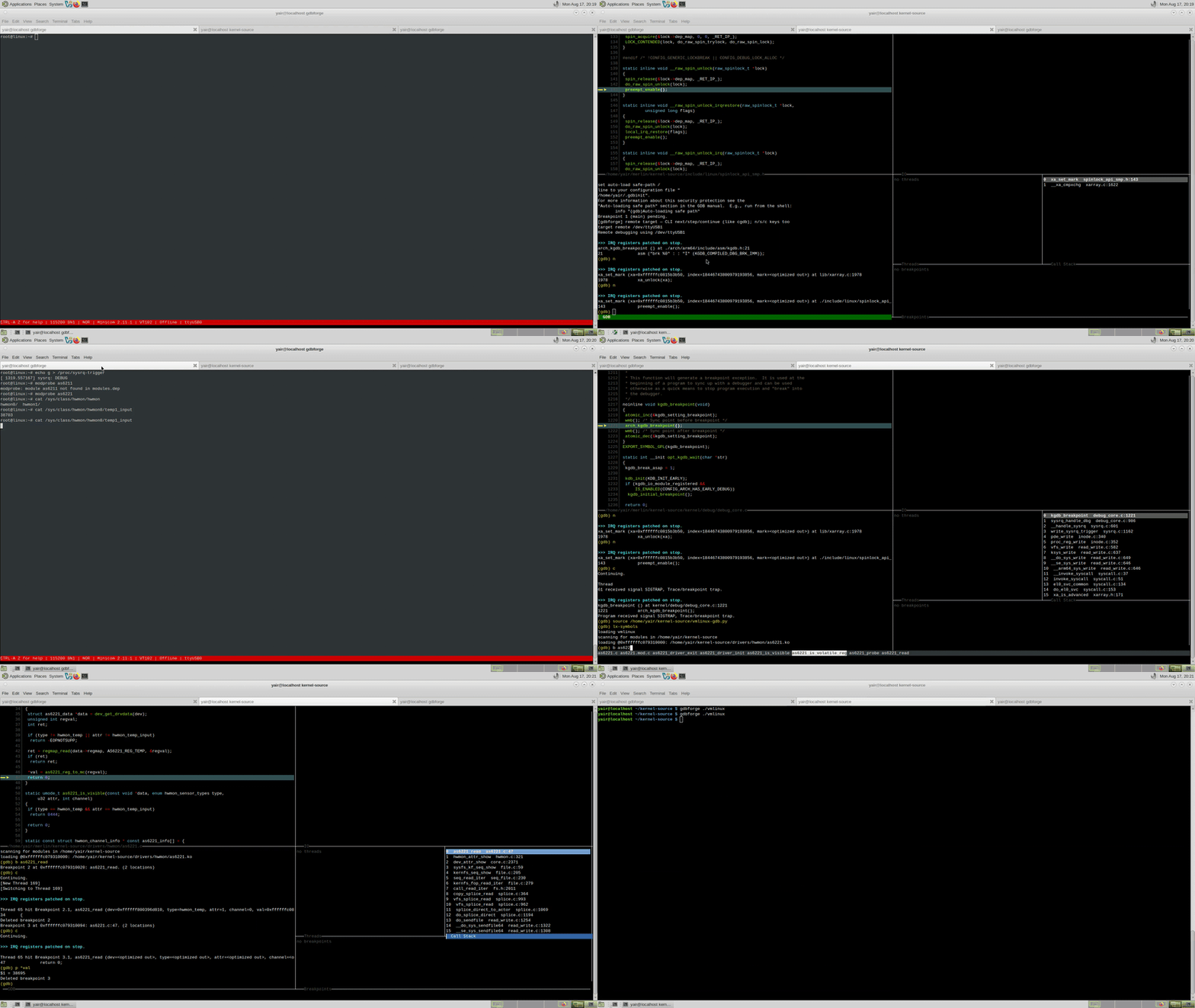
The screencast shows gdbforge + GDB on a dedicated kgdb UART (/dev/ttyUSB1) while a separate console UART stays in minicom (/dev/ttyUSB0): lx-symbols, a breakpoint in a loadable module, trigger from the console (cat /dev/…), stop in :b gdb, step, continue back to the shell — no serial mux and no Lua bring-up script.
Wiring (example — adjust names for your board)
| Board UART | Role | Host side |
|---|---|---|
PS0 / ttyS0 |
Linux console — login shell, minicom | /dev/ttyUSB0 |
PS1 / ttyPS1 |
kgdb stub line (gdb remote protocol) | /dev/ttyUSB1 |
Nothing on the host may open both devices as one session — they are separate cables. gdbforge talks to the kgdb port via GDB; you keep a normal terminal (minicom, screen, …) on the console port.
flowchart LR
  PS0["Board PS0\n(console)"] --> USB0["/dev/ttyUSB0"]
  PS1["Board PS1\n(kgdb)"] --> USB1["/dev/ttyUSB1"]
  USB0 --> Minicom[minicom / shell]
  USB1 --> GDB["GDB target remote"]
GDB --> MI[gdbforge :b gdb]Prerequisites
- Kernel built with kgdb (
CONFIG_KGDB,CONFIG_KGDB_SERIAL, …) and a matchingvmlinuxon the host. - Kernel GDB helpers so
lx-symbolsworks — source the kernel tree'svmlinux-gdb.py(not shipped in gdbforge). - Two USB–serial adapters (or onboard dual-UART wiring) with known device nodes on the host.
- Do not run
:lua kgdb_serial, kdmx, or:serial-switchfor this path — they are for one shared UART only.
Stage 1 — Console + kgdboc (board, once per boot)
- Start minicom (or your usual serial terminal) on the console device, e.g.
minicom -D /dev/ttyUSB0. - From that console shell, point kgdb at the debug UART (the second cable, not the console):
Use the tty name that matches PS1 on your board (ttyS1, ttyAMA1, …). This tells the kernel which port speaks the gdb stub protocol when kgdb stops.
Optional: boot with kgdboc=ttyPS1,115200 on the kernel cmdline instead of the echo above.
Stage 2 — gdbforge + GDB attach (host)
Start gdbforge with GDB (no special Lua script):
In :b gdb, load symbols and attach to the kgdb UART only (/dev/ttyUSB1 in the example — not the console cable):
(gdb) file /path/to/vmlinux
(gdb) source /path/to/kernel-source/vmlinux-gdb.py
(gdb) target remote /dev/ttyUSB1
(gdb) lx-symbols /path/to/kernel-source
After target remote, gdbforge enters kgdb mode on the MI console (n / s / c, lighter post-stop refresh). The console minicom window stays independent on /dev/ttyUSB0.
Stage 3 — Break in while the kernel is running
With the kernel running and GDB already attached on PS1, trigger a stop from the console (PS0):
GDB on PS1 receives the kgdb stop packet ($T05…). gdbforge shows the stop in :b gdb (Call Stack, source when symbols match). Step with n / s, then (gdb) continue to return the kernel to the shell on PS0.
Stage 4 — Module / driver breakpoint
This is the usual loop after the first attach:
- In
:b gdb, set a breakpoint in the loadable module or driver (e.g. an IRQ handler or ioctl path):
(gdb) continue— the kernel runs; minicom on PS0 stays live (no UART switch).- On the console, exercise the driver so the breakpoint hits — in the two-UART screencast, something like:
- GDB stops on PS1; debug in gdbforge (
n,s,bt, …). (gdb) continue— execution returns to the shell prompt on the console UART.
Because console and gdb use different wires, step 3 works reliably: the kgdb stop reply always reaches GDB even though you triggered the stop from minicom.
Typical session (quick reference)
# Host terminal A — console (always)
minicom -D /dev/ttyUSB0

# Host terminal B — gdbforge
./gdbforge -g gdb
(gdb) file vmlinux
(gdb) source …/vmlinux-gdb.py
(gdb) target remote /dev/ttyUSB1
(gdb) lx-symbols /path/to/kernel-source
(gdb) break my_driver_fn
(gdb) continue

# In minicom (console):
cat /dev/my_device          # → hits BP; debug in :b gdb
# … n / s / bt …
(gdb) continue              # → back to shell on PS0
Compared to one UART / mux
| Two UARTs (this path) | One UART (kgdb_serial / kdmx) |
|
|---|---|---|
| Host setup | minicom + target remote on second device |
mux + PTYs + owner switch |
| Console while kernel runs | Always on PS0 | Only when mux owner = console |
cat / driver → breakpoint |
Works | Fails unless gdb leg owns UART before trigger |
| Lua scripts required | No | kgdb_serial / kgdb_trigger or kdmx |
| Demo screencast | Yes (above) | Yes (Path 1) |
When you only have one cable, use Path 1b — One UART, in-process mux or Path 1 — UART + kdmx instead.
Path 1 — UART + kdmx
When to use this: one USB serial cable to the board; kdmx splits it into a console PTY (minicom) and a gdb PTY. The :lua kgdb_uart script automates kgdboc setup, kdmx, sysrq break-in, and target remote — stopped in debug mode in about two seconds.
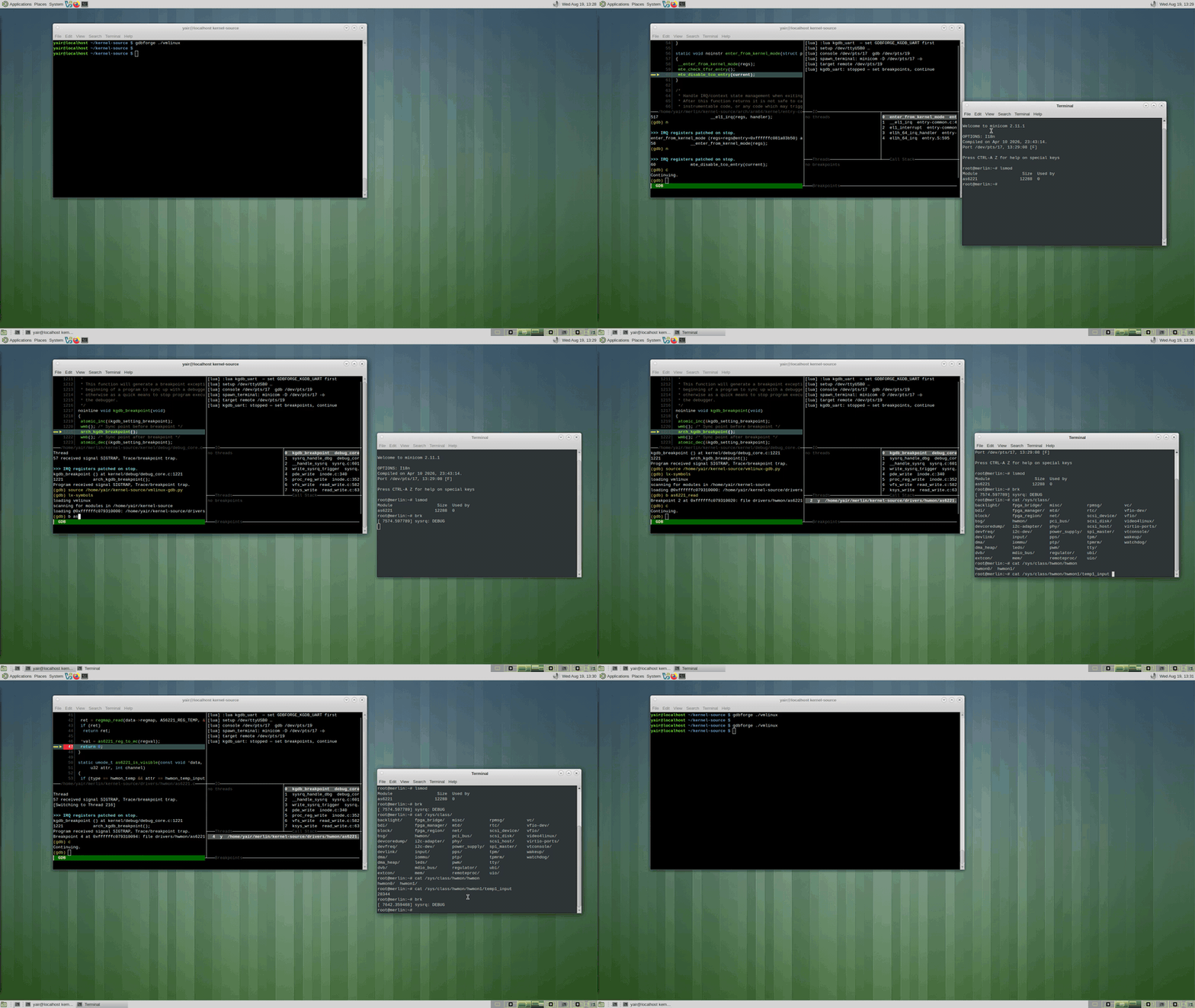
Watch on YouTube — :lua kgdb_uart
The screencast shows the full loop: :lua kgdb_uart → lx-symbols → breakpoint on a driver's read handler → (gdb) continue → cat /dev/… in minicom → stop in :b gdb → step → continue back to the shell.
flowchart LR
  BoardUART[Board_UART] --> KDMX[kdmx]
  KDMX --> ConsPTY[console_PTY]
  KDMX --> GdbPTY[gdb_PTY]
  ConsPTY --> Minicom[minicom]
  GdbPTY --> GDB["GDB target remote"]
  GDB --> MI[gdbforge_MI_console]
Future: replace the kdmx box with an optional in-process SerialMux behind the same :lua kgdb_uart UX.
One-shot UX
export GDBFORGE_KGDB_UART=/dev/ttyUSB0
export GDBFORGE_KGDB_VMLINUX=/path/to/vmlinux
export GDBFORGE_KGDB_MODULES=/path/to/kernel/build   # optional, for lx-symbols
export GDBFORGE_TERMINAL=mate-terminal

# kdmx on PATH (build from agent-proxy); board waiting in kgdb:
#   kgdboc=<uart>,kgdbwait

./bin/gdbforge -g gdb
# then:
:lua kgdb_uart 8250
After the script returns you are stopped in debug mode (file + target remote + lx-symbols). Then:
sequenceDiagram
  participant User
  participant Lua as kgdb_uart
  participant Kdmx as kdmx
  participant Minicom
  participant GDB
  participant Board

  User->>Lua: :lua kgdb_uart 8250
  Lua->>Kdmx: start on UART
  Lua->>Minicom: spawn on console PTY
  Lua->>GDB: file vmlinux
  Lua->>GDB: target remote gdb_PTY
  Board-->>GDB: kgdb waiting
  Lua->>GDB: lx-symbols
  Note over User,GDB: STOPPED debug mode
  User->>GDB: break irq then continue
  User->>Minicom: cat /dev/ttyS2
Board-->>GDB: hit breakpointPrerequisites
- Host: kdmx from agent-proxy — see Building kdmx (tested setup) below. Nothing else may hold the serial device.
- Board: kgdb + kgdboc; typically boot with
kgdboc=<uart>,kgdbwait(or break in before attach). - Matching
vmlinux/ module debug info; kernel GDB helpers available solx-symbolsworks (kernelscripts/gdb, auto-load safe path — not shipped in gdbforge).
Env (kgdb_uart)
| Variable | Default | Meaning |
|---|---|---|
GDBFORGE_KGDB_UART |
(required) | Serial device, e.g. /dev/ttyUSB0 |
GDBFORGE_KGDB_BAUD |
115200 |
Baud |
GDBFORGE_KGDB_VMLINUX |
(empty) | Path to vmlinux |
GDBFORGE_KGDB_MODULES |
(empty) | Extra search path for lx-symbols |
GDBFORGE_KGDB_SCRIPTS |
(empty) | Kernel tree with scripts/gdb (sourced so lx-symbols exists) |
GDBFORGE_KGDB_KDMX |
kdmx |
kdmx binary |
GDBFORGE_KGDB_CONSOLE_CMD |
minicom |
Console program (minicom -D <pty> -o, else <cmd> <pty>) |
GDBFORGE_KGDB_TAKEOVER |
auto |
How to claim the UART: auto (kill known serial consoles), force (kill any holder), never (abort while held) |
GDBFORGE_KGDB_FORCE |
0 |
Deprecated alias for GDBFORGE_KGDB_TAKEOVER=force |
GDBFORGE_KGDB_RETRIES |
3 |
kdmx start attempts |
GDBFORGE_TERMINAL |
auto | Emulator for spawn_terminal |
UART ownership
kdmx must be the only reader of the serial device, so kgdb_uart claims it before
starting kdmx. Holders are found with fuser (falling back to lsof), then handled
according to GDBFORGE_KGDB_TAKEOVER:
| Mode | Behavior |
|---|---|
auto (default) |
Terminate known serial consoles — minicom, picocom, screen, socat, tio, cu, agent-proxy, stale kdmx. Any other holder aborts the run. |
force |
Terminate whatever holds the device. |
never |
Never kill; abort while the device is held. |
Terminated processes get SIGTERM, then SIGKILL if they don't release within 5s.
minicom is reopened on the console PTY instead of the raw device.
If two programs read the same UART, kdmx dies with
serial port read() [1] unexpected errno 11 and GDB later reports
Remote connection closed. The script now detects that and prints the kdmx log.
kdmx and errno 11 (EAGAIN)
Why patch? (simple) One USB cable carries both the Linux shell (minicom) and GDB (kgdb). kdmx splits that single wire into two virtual ports. On USB serial, the host sometimes signals “maybe data” but read() still returns “not yet” — that is normal (EAGAIN, errno 11). Original kdmx treats that as a crash and quits, so GDB loses the connection (Remote connection closed). The gdbforge patch waits briefly and keeps running instead. You do not need this patch if you use two UARTs, Ethernet (:lua kgdb_net), or the in-process mux (:lua kgdb_serial) — only when you rely on one UART + kdmx (:lua kgdb_uart).
Typical wiring (board UART + FTDI → host USB) — this is the common case the patch targets:
Board ttyPS0  ──wire──►  FTDI USB adapter  ──USB──►  Host /dev/ttyUSB0  ──►  kdmx
   (console + kgdb)         (serial bridge)              (one open fd)
The board UART is fine. The timing quirk happens on the PC side: kdmx reads /dev/ttyUSB0 through the USB serial driver (FTDI, CP2102, …). That stack is asynchronous — select() can wake up before a byte is actually available to read().
flowchart LR
  subgraph board [Board]
    PS0["ttyPS0\nconsole + kgdb"]
  end
  subgraph cable [Cable]
    FTDI["FTDI / USB-UART"]
  end
  subgraph host [Host PC]
    USB0["/dev/ttyUSB0"]
    KDMX[kdmx]
    CON["console PTY\nminicom"]
    GDB["gdb PTY\nGDB target remote"]
    USB0 --> KDMX
    KDMX --> CON
    KDMX --> GDB
  end
  PS0 --> FTDI --> USB0
sequenceDiagram
participant Kdmx as kdmx on host
participant USB as USB serial driver
participant FTDI as FTDI ttyUSB0
Note over Kdmx,FTDI: Non-blocking read path — common with USB adapters
Kdmx->>USB: select — fd readable?
USB-->>Kdmx: yes maybe
Kdmx->>FTDI: read one byte
FTDI-->>Kdmx: EAGAIN errno 11 not yet
alt upstream kdmx unpatched
Kdmx->>Kdmx: treat as fatal — exit
Note over Kdmx: Remote connection closed
else gdbforge patched kdmx
Kdmx->>Kdmx: wait briefly retry
Kdmx->>FTDI: read again
FTDI-->>Kdmx: data byte
Note over Kdmx: session stays up
end| Layer | Role in EAGAIN issue |
|---|---|
Board ttyPS0 |
Normal UART; not the root cause |
| FTDI / USB cable | Converts serial ↔ USB; buffering adds timing |
Host /dev/ttyUSB0 |
Where kdmx reads — EAGAIN happens here |
| kdmx | Must tolerate “not yet”; upstream does not |
Technical detail: upstream kdmx opens fds non-blocking; select() can report readable while read() still returns EAGAIN. Upstream exits on that; pressing a key in minicom often reproduces it on FTDI → ttyUSB0 setups.
gdbforge needs a patched kdmx that retries the read and lets each caller recover.
The patch identifies itself in -v:
$ kdmx -v
kdmx 141210a-gdbforge1     # patched — recommended for :lua kgdb_uart
$ kdmx -v                  # upstream agent-proxy without patch
kdmx 141210a               # exits on EAGAIN — avoid for one-UART + kdmx
kgdb_uart prints which binary it chose and warns when it is not the patched build.
Override with GDBFORGE_KGDB_KDMX=/path/to/kdmx.
Building kdmx (tested setup)
Source: agent-proxy (kdmx/ subdirectory).
Use the tested commit — not master. Clone agent-proxy and checkout the SHA below. We have not validated arbitrary newer upstream commits; stick to this known-good base, then apply the gdbforge patch.
Tested upstream commit (used for the :lua kgdb_uart screencast and day-to-day kernel debug):
Short: 468fe4c — “Makefile: Bump version number for fixes” (2018-04-30).
Vanilla upstream at that SHA still exits on EAGAIN — the patch is always required for one-UART + kdmx. Apply the gdbforge patch from this repo, then build:
git clone https://git.kernel.org/pub/scm/utils/kernel/kgdb/agent-proxy.git
cd agent-proxy
git checkout 468fe4c31e6c62c9bbb328b06ba71eaf7be0b76a   # not master — use this SHA
patch -p1 < /path/to/gdbforge/tools/kdmx-gdbforge.patch
cd kdmx && make
./kdmx -v
# → kdmx 141210a-gdbforge1
Point gdbforge at the built binary (or put it on PATH ahead of any upstream kdmx):
export GDBFORGE_KGDB_KDMX=$HOME/agent-proxy/kdmx/kdmx
# example host path; adjust for your clone location
| Item | Value |
|---|---|
| Upstream repo | https://git.kernel.org/pub/scm/utils/kernel/kgdb/agent-proxy.git |
| Checkout | 468fe4c31e6c62c9bbb328b06ba71eaf7be0b76a (not master) |
| gdbforge patch | tools/kdmx-gdbforge.patch (required after checkout) |
Expected kdmx -v |
kdmx 141210a-gdbforge1 |
If you already have agent-proxy checked out elsewhere (e.g. ~/agent-proxy), git checkout 468fe4c, apply the patch, and make in kdmx/. kgdb_uart also looks for ./bin/kdmx next to the gdbforge binary when GDBFORGE_KGDB_KDMX is unset.
Path 1b — One UART, in-process mux (semi-automatic)
Status: experimental. gdbforge holds the physical UART and publishes two PTYs
(console + gdb). This replaces external kdmx for the same cable, but one shared
UART cannot be fully automated the way two independent links can.
| Setup | Console while kernel runs | GDB while stopped | Automation |
|---|---|---|---|
One UART (kgdb_serial) |
minicom on console PTY | target remote on gdb PTY |
Semi-auto — you switch owner or use :lua kgdb_trigger |
| Two UARTs (console + debug) | Real second port or SSH | Dedicated kgdb line | Much easier — no mux race |
Ethernet (kgdb_net) |
SSH | TCP target remote |
Easiest — no serial mux |
Architecture
flowchart TB
  USB["/dev/ttyUSB0\n(only gdbforge opens this)"]
  MUX[SerialMux in gdbforge]
  CON["console PTY\n→ minicom"]
  GDB["gdb PTY\n→ target remote"]
  USB --> MUX
  MUX --> CON
  MUX --> GDB
At any moment one leg owns USB RX/TX. gdbforge switches owner; it does not parse kgdb RSP packets to guess state.
Scripts
| Command | When | What it does |
|---|---|---|
:lua kgdb_serial |
Once per session | Open USB, create mux + 2 PTYs, spawn minicom, print PTY paths |
:lua kgdb_trigger |
Each break-in | echo g > /proc/sysrq-trigger then :serial-switch gdb |
:lua kgdb_trigger console |
Manual | :serial-switch console |
:serial-switch gdb |
Manual | GDB leg owns USB |
:serial-switch console |
Manual | minicom leg owns USB |
:serial-switch status |
Anytime | Show current owner |
Install (project overrides embedded catalog):
mkdir -p .gdbforge/lua
cp -r lua/kernel/kgdb_serial lua/kernel/kgdb_trigger .gdbforge/lua/
go build -o gdbforge ./cmd/gdbforge
Env
| Variable | Default | Meaning |
|---|---|---|
GDBFORGE_KGDB_UART |
/dev/ttyUSB0 |
Physical serial device |
GDBFORGE_KGDB_BAUD |
115200 |
Baud |
GDBFORGE_KGDB_TAKEOVER |
auto |
Claim UART from other holders (fuser) |
Board-side kgdboc (once per boot, in minicom or via serial_send):
(Adjust ttyPS1 for your board.)
Happy path — semi-automatic loop
After target remote works once, the usual repetitive cycle is:
# ── once ──
:lua kgdb_serial
:serial-switch gdb
(gdb) file /path/to/vmlinux
(gdb) source /path/to/kernel-source/vmlinux-gdb.py
(gdb) target remote /dev/pts/N          ← gdb PTY printed by kgdb_serial (NOT console PTY)
(gdb) lx-symbols

# ── each break-in (kernel was running, minicom had console) ──
:lua kgdb_trigger                       ← sysrq + switch to gdb
# … debug in :b gdb: n / s / c / bt …

# ── back to console ──
(gdb) continue                          ← UART returns to minicom on ^running
# minicom live again

# ── repeat ──
:lua kgdb_trigger
…
continue behaviour: gdbforge does not switch UART immediately on
continue (that would block GDB from finishing the continue packet). It arms
a switch and moves USB back to minicom when MI reports ^running (kernel
actually running). You should see:
Or switch manually after the kernel is running:
Validated manual break-in (when scripts misbehave)
Same order every time — switch gdb before sysrq, or the kgdb stop reply
($T…) goes to minicom and GDB never sees it:
:serial-switch gdb
(gdb) target remote /dev/pts/N          ← once per mux session (gdb PTY only)
gdbforge.serial_send("echo g > /proc/sysrq-trigger")
# … debug …
(gdb) continue                          ← or :serial-switch console after ^running
Do not type echo g in minicom after :serial-switch gdb — minicom TX
is frozen while GDB owns the wire. Use gdbforge.serial_send(...) or switch
console first.
:lua kgdb_trigger intentionally does sysrq then switch (minimal script).
For the safest manual order, use the sequence above instead.
Why one UART is only semi-automatic
| Problem | Why |
|---|---|
| Stop packet race | Kernel enters kgdb and sends $T… on serial before MI says stopped. Owner must already be gdb (or entering-debugger). |
| SysRq on serial | echo g must reach the board on the active TX path — owner matters. |
continue vs console |
Switching UART too early on continue corrupts the gdb stub session. |
| Re-trigger | After first attach, kernel running + stale GDB state may need ^C / interrupt before another sysrq. |
Two UARTs (or Ethernet + SSH) avoid all of this: console and gdb never share a wire.
Known limitation: breakpoint from console
If the kernel is running with the mux on the console leg (normal after
(gdb) continue), triggering a kernel breakpoint from minicom — e.g.
cat /dev/… on a driver you are debugging — fails the same way as a mistimed
sysrq: kgdb sends $T05… on serial immediately, the packet lands in
minicom, and GDB never sees it. Manual :serial-switch gdb afterward is too
late; :lua kgdb_trigger does not help (it only sysrq-s, not BP-from-console).
Owner-based switching cannot fix this without RSP packet parsing on the
wire (kdmx-class demux). For console-driven breakpoints, use two UARTs,
:lua kgdb_kdmx, or :lua kgdb_net, or stay on the gdb leg and do not
return to minicom before the trigger.
When things go wrong — recovery
Typical failure modes and what operators do in practice:
| Symptom | Likely cause | Recovery |
|---|---|---|
| GDB hangs / no stop after sysrq | Stop packet went to minicom | :serial-switch gdb, re-send sysrq, or full re-attach |
Remote connection closed |
mux/GDB wedged, wrong PTY, or continue switched too early | Start clean session (below) |
minicom dead after continue |
Switch before ^running, or kernel panic |
:serial-switch console after kernel runs; else reset board |
| GDB stuck, UI frozen | kgdb on slow serial + heavy MI | Use kgdb mode (n/s/c CLI); avoid piling MI queries |
| Second break-in fails | GDB still thinks it's running | In :b gdb: Ctrl-C (^C), then interrupt, then trigger again |
| Nothing helps | Session corrupted | Kill and restart (below) |
Clean restart (usual fix):
1. (gdb) kill                    # or detach if kill unsupported
2. :serial-switch console        # optional — see minicom
3. Reset board / fix kernel if needed
4. :lua kgdb_serial              # or :terminal close then kgdb_serial again
5. :serial-switch gdb
6. (gdb) target remote /dev/pts/N   ← from scratch, new gdb PTY if mux reopened
7. lx-symbols if needed
8. break-in again (manual or :lua kgdb_trigger)
If gdbforge itself hangs on :q! with serial mux open, Ctrl-C may still be needed
once; :terminal close releases the USB port before quit when possible.
kgdb mode in gdbforge
After target remote or :serial-switch gdb, gdbforge enables kgdb mode:
- CLI
next/step/continue(not slow MI-exec-*on serial) n/s/ckeys in the gdb buffer- Lighter post-stop work (Call Stack may show frame 0 until
(gdb)prompt; full backtrace depends on-stack-list-framesafter stop)
Quick reference
:lua kgdb_serial              setup mux + minicom
:lua kgdb_trigger               sysrq + switch gdb (semi-auto break-in)
:serial-switch gdb|console      manual UART owner
:terminal status                mux + PTY paths
:terminal close                 release USB
(gdb) target remote <gdb PTY>   attach once per mux session
(gdb) continue                  running → minicom on ^running
Relation to kgdb_uart (kdmx)
kgdb_uart (kdmx) |
kgdb_serial (in-process) |
|
|---|---|---|
| Who opens USB | kdmx subprocess | gdbforge |
| PTYs | kdmx creates | gdbforge internal/serialmux |
| Maturity | Production-ish + patched kdmx | Experimental semi-auto |
| When to prefer | Stable daily driver | Single binary, no kdmx, accept manual steps |
Path 2 — Ethernet / separate console (no mux)
Console is SSH (or a second UART). GDB uses TCP — same target remote model as QEMU/OpenOCD stubs.
flowchart LR
  SSH[SSH_console] --> Shell[board_shell]
  Eth[kgdb_TCP] --> GDB["GDB target remote host:port"]
  GDB --> MI[gdbforge_MI_console]
export GDBFORGE_REMOTE_HOST=192.168.20.50
export GDBFORGE_KGDB_PORT=6443
export GDBFORGE_KGDB_VMLINUX=/path/to/vmlinux
export GDBFORGE_KGDB_SSH_CONSOLE=1 # optional
:lua kgdb_net 8250
Optional: GDBFORGE_KGDB_KO + module name → SSH read of /sys/module/.../sections then add-symbol-file (when network is up). Prefer lx-symbols when kernel GDB scripts are loaded.
Symbols (lx-symbols)
lx-symbols loads symbols into GDB on the host. It does not upload files to the board. Modules must already be loaded on the target; local .ko / build tree must match.
gdbforge does not copy Linux scripts/gdb into the repo. lx-symbols only exists
once GDB sources the kernel's own vmlinux-gdb.py; otherwise you get:
The Lua scripts look for it next to vmlinux, in GDBFORGE_KGDB_MODULES, or under
GDBFORGE_KGDB_SCRIPTS (<tree>/scripts/gdb/vmlinux-gdb.py), then source it after
add-auto-load-safe-path. Equivalent manual form:
A stale list_for_each: Uninitialized list '<modules>' treated as empty warning means
lx-symbols ran with no live target — fix the connection first.
Undefined command: "import"
This means GDB sourced the script as a GDB command file instead of Python, which
is what script-extension soft (the default) does when Python is unavailable. The
first Python line, import os, is then read as a GDB command.
The Lua scripts now probe the session's GDB (gdbforge.debugger_path()) with
gdb -nx --batch -ex 'python print(...)' before sourcing, and refuse to source with
the real reason instead of that cascade. Common causes:
| Cause | Fix |
|---|---|
Bad PYTHONHOME / PYTHONPATH inherited from the shell |
unset PYTHONHOME PYTHONPATH |
| GDB built without Python (common for vendor cross-GDBs) | gdbforge -g gdb -d /path/to/python-enabled-gdb |
Check by hand with:
A hostile ~/.gdbinit can also interfere; start with gdbforge -g gdb -- -nx to skip it.
Fallback: pass addresses / use SSH sysfs + add-symbol-file (see kgdb_common).
Design note
Kernel bring-up stays a Lua recipe (like remotegdb / Cortex-R5 scripts): gdbforge core stays the debugger UI + session. In-process UART mux is optional later; document and keep the same :lua kgdb_uart entry point.
See also: LUA_API.md, lua/README.md, DEBUGGER_INTEGRATION.md (kernel section). For a JTAG alternative on Zynq UltraScale+ — attach to a running kernel with vmlinux and lx-symbols, no kgdboc — see MPSoC debug.