Debugging STM32 firmware — bare-metal, Zephyr and FreeRTOS
gdbforge is a Vim-inspired GDB terminal UI for STM32 bare-metal, Zephyr, and FreeRTOS development. Lua scripts under lua/stm32/ spawn ST-Link + OpenOCD or J-Link GDB Server over SWD, attach GDB, and stop at main — the ST-Link scripts with monitor reset halt, the J-Link script after load.
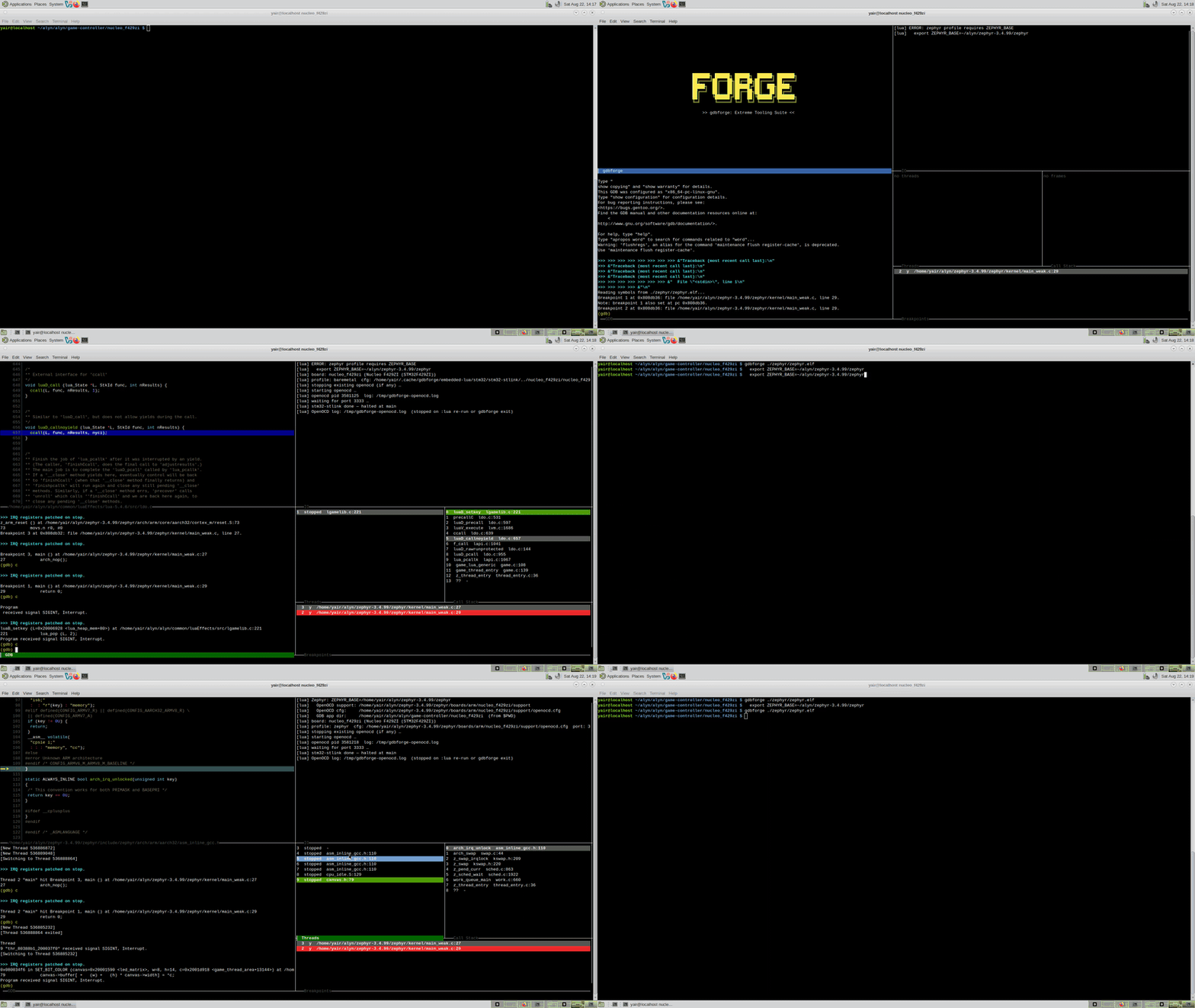
Demo — Nucleo F429ZI (Zephyr)
Nucleo-F429ZI / ST-Link + OpenOCD — first, bare-metal debug of a Zephyr app on the Nucleo board (:lua nucleo_f429zi baremetal); then switch to Zephyr-aware debug (:lua nucleo_f429zi zephyr) with info threads and on-board displays. Watch on YouTube.
Prerequisites
| Need | Why | Check |
|---|---|---|
| gdbforge installed | — | gdbforge -version (install) |
arm-none-eabi-gdb (or the Zephyr SDK's arm-zephyr-eabi-gdb) |
Cortex-M is 32-bit ARM; the scripts run set architecture arm. The host gdb cannot debug it |
arm-none-eabi-gdb --version |
| OpenOCD ≥ 0.12 (ST-Link boards) or J-Link software | Serves GDB over SWD | openocd --version |
| ST-Link / J-Link probe, plus udev rules on Linux | Probe access without sudo |
lsusb shows the probe |
Firmware ELF built with -g |
Source-level debugging needs DWARF | file build/zephyr/zephyr.elf |
ZEPHYR_BASE exported (Zephyr only) |
The scripts dir the Zephyr and app sources so stepping shows code |
echo $ZEPHYR_BASE |
| (optional) a clone of the gdbforge repo | The lua/stm32/ board scripts already ship inside the binary — clone only to edit them locally (precedence) |
— |
Point gdbforge at the cross GDB with -d:
Getting started (order of operations)
Follow these steps once, then repeat from step 5 for each debug session.
- Host tools — install OpenOCD (ST-Link boards) and/or J-Link software (board 2 J-Link path). See OpenOCD version and install below.
- USB / udev — plug in the board; ensure ST-Link is visible (
lsusb). On Linux, install OpenOCD udev rules if permission denied. - gdbforge — build or install gdbforge; verify
openocd --versionon PATH. - Board scripts — nothing to do: the board scripts ship inside the binary. Copy a folder into your project only if you want to edit it, since project-local scripts win over the embedded catalog (see Lua API):
mkdir -p .gdbforge/lua
cp -r /path/to/gdbforge/lua/stm32/nucleo_f429zi .gdbforge/lua/   # board 1
cp -r /path/to/gdbforge/lua/stm32/stm32f405 .gdbforge/lua/       # board 2
- Build firmware — Zephyr
west build, Makefile, CMake, etc.; note path tozephyr.elf/firmware.elf. - Environment — export board-specific vars (Zephyr
ZEPHYR_BASE, OpenOCD cfg paths — see board sections below). - Launch gdbforge with your ELF from the build directory, e.g.
gdbforge ./zephyr/zephyr.elf - Connect probe —
:lua nucleo_f429zi(orstm32f405_stlink/stm32f405_jlink). - Debug — you are stopped at
main; see To your first breakpoint below.
OpenOCD is started detached (like kdmx): the :lua job finishes and Ctrl-C no longer tears down OpenOCD. It is stopped when you run :lua nucleo_f429zi again or when gdbforge exits.
To your first breakpoint
Unlike the MPSoC scripts, the STM32 scripts do continue for you: the ST-Link flow ends in
break main + continue, so when :lua nucleo_f429zi returns, the core is already
stopped at main and ━━▶ marks the program counter in the Code pane.
- Move the cursor to any line in the Code pane and press Space to toggle a breakpoint there.
- Press c to continue, n to step over, s to step into,
f to finish the frame. The Call Stack, Threads and Breakpoints panes refresh
at every stop; for variables use
print/info localsin:b gdb. - For Zephyr thread awareness, use the
zephyrprofile (:lua nucleo_f429zi zephyr) and runinfo threadsin:b gdb. :b gdbis the real GDB console (info registers,x/16x $sp,monitor reset halt, …); the OpenOCD log is at/tmp/gdbforge-openocd.log(orGDBFORGE_OPENOCD_LOG).
If it did not stop at main, the usual causes are a probe that never enumerated (check
lsusb and the OpenOCD log), a stale OpenOCD holding port 3333, or an ELF that does not
match what is flashed. Each script also defines help() listing its environment variables.
OpenOCD version and install
ST-Link scripts (nucleo_f429zi, stm32f405_stlink) run openocd on the host. gdbforge does not bundle OpenOCD.
Version
| Tested with | OpenOCD 0.12.0 (current stable; works with Nucleo F429ZI + Zephyr -rtos Zephyr) |
| Minimum | 0.12.0 recommended; Zephyr thread awareness (info threads) needs > 0.11.0 |
| Check | openocd --version → should print Open On-Chip Debugger 0.12.x |
Scripts path (for [find board/…] in cfg): usually /usr/share/openocd/scripts on Linux.
Download & install
Official project
- Home: https://openocd.org/
- Getting OpenOCD: https://openocd.org/pages/getting-openocd.html
- Source / releases: https://github.com/openocd-org/openocd/releases
Linux package managers (fastest if version ≥ 0.12)
# Debian / Ubuntu
sudo apt update && sudo apt install openocd

# Fedora
sudo dnf install openocd

# Gentoo
sudo emerge -av openocd
Zephyr SDK (includes OpenOCD + scripts + udev rules)
- Download: https://github.com/zephyrproject-rtos/sdk-ng/releases
- After install, OpenOCD is under the SDK sysroot; udev rules:
sudo cp $ZEPHYR_SDK_INSTALL_DIR/sysroots/x86_64-pokysdk-linux/usr/share/openocd/contrib/60-openocd.rules /etc/udev/rules.d/
sudo udevadm control --reload
Point gdbforge at SDK OpenOCD if not on PATH:
Build from source (latest git)
git clone https://github.com/openocd-org/openocd.git
cd openocd
./bootstrap && ./configure --enable-stlink && make -j$(nproc)
sudo make install
Override binary (any install location):
Board catalog (extensible)
Scripts are grouped by board folder: lua/stm32/<board>/. The list below is the first two entries; new boards are added as new folders (same layout). Board number is documentation order only — not a version or priority flag.
| # | Board folder | MCU / kit | :lua scripts |
Probe |
|---|---|---|---|---|
| 1 | nucleo_f429zi/ |
STM32F429ZI (Nucleo-F429ZI) | nucleo_f429zi, nucleo_f429zi_stlink |
On-board ST-Link + OpenOCD |
| 2 | stm32f405/ |
STM32F405 | stm32f405_stlink, stm32f405_jlink |
ST-Link + OpenOCD or J-Link SWD |
| 3+ | <board>/ |
(future) | <board>_stlink, … |
per board |
Adding board #3: create lua/stm32/<board>/ with at least one *.lua (:lua command = basename) and optional *_openocd.cfg. Copy nucleo_f429zi/ for ST-Link + Zephyr/OpenOCD, or stm32f405/ for a generic F4 + J-Link variant. Update this table and lua/stm32/README.md.
Install scripts into the project (no gdbforge rebuild):
mkdir -p .gdbforge/lua
cp -r lua/stm32/nucleo_f429zi .gdbforge/lua/   # board 1
cp -r lua/stm32/stm32f405 .gdbforge/lua/       # board 2
1 · Nucleo F429ZI (ST-Link + OpenOCD)
Typical Zephyr app on Nucleo-F429ZI.
Command line
Example (west build dir = project folder; ELF at zephyr/zephyr.elf):
cd ~/alyn/alyn/game-controller/nucleo_f429zi
mkdir -p .gdbforge/lua
cp -r /path/to/gdbforge/lua/stm32/nucleo_f429zi .gdbforge/lua/

export ZEPHYR_BASE=~/alyn/zephyr-3.4.99/zephyr

gdbforge ./zephyr/zephyr.elf
Inside gdbforge:
Only ZEPHYR_BASE is required for Zephyr. OpenOCD board cfg and GDB app dir are derived from ZEPHYR_BASE and your $PWD. Profile zephyr enables OpenOCD -rtos Zephyr (needs CONFIG_DEBUG_THREAD_INFO=y). Stops at main. Check threads: info threads in :b gdb.
For bare metal (no thread awareness): :lua nucleo_f429zi baremetal — ignores ZEPHYR_BASE for RTOS.
ST-Link script flow
OpenOCD (background) → wait port 3333 → dir Zephyr paths → target remote → break main → continue (stops at main).
Optional env: GDBFORGE_OPENOCD, GDBFORGE_OPENOCD_PORT (default 3333).
2 · STM32F405 (ST-Link + OpenOCD)
Same ST-Link / OpenOCD pattern as board 1.
mkdir -p .gdbforge/lua
cp -r lua/stm32/stm32f405 .gdbforge/lua/
export GDBFORGE_OPENOCD_SCRIPTS=/usr/share/openocd/scripts   # if bundled cfg [find …] fails
gdbforge ./build/firmware.elf
:lua stm32f405_stlink
Then :b gdb: continue to run (already loaded and stopped at main if script finished OK).
2 · STM32F405 (J-Link SWD)
cp -r lua/stm32/stm32f405 .gdbforge/lua/
export GDBFORGE_JLINK=/opt/JLink_Linux_V914a_x86_64/JLinkGDBServer
gdbforge ./build/firmware.elf
:lua stm32f405_jlink
Spawns J-Link, target remote, load, break main.
Script catalog (all boards)
| # | Board | :lua |
Probe | Purpose |
|---|---|---|---|---|
| 1 | Nucleo F429ZI | nucleo_f429zi |
ST-Link + OpenOCD | Bare-metal, Zephyr, or FreeRTOS profile |
| 1 | nucleo_f429zi_stlink |
(alias) | same | |
| 2 | STM32F405 | stm32f405_stlink |
ST-Link + OpenOCD | Bare-metal, Zephyr, or FreeRTOS profile |
| 2 | stm32f405_jlink |
J-Link SWD | J-Link + load + break main |
Zephyr awareness (GDB, not gdbforge core)
gdbforge does not embed Zephyr-specific logic. Use standard GDB setup:
| Need | How |
|---|---|
| Source paths | export ZEPHYR_BASE=~/alyn/zephyr-3.4.99/zephyr then :lua … zephyr — script runs dir $ZEPHYR_BASE and dir $PWD |
| Cross-GDB | gdbforge -d …/arm-zephyr-eabi-gdb -- ./zephyr/zephyr.elf |
| OpenOCD board cfg | derived from $ZEPHYR_BASE/boards/arm/<board>/support/openocd.cfg |
info threads (Zephyr RTOS) |
CONFIG_DEBUG_THREAD_INFO=y and :lua … zephyr and ZEPHYR_BASE set |
FreeRTOS awareness
The ST-Link scripts accept a freertos profile alongside baremetal and zephyr. It configures the OpenOCD target with -rtos FreeRTOS and then runs the same attach sequence as baremetal:
Unlike zephyr, this profile needs no ZEPHYR_BASE and adds no GDB source directories; OpenOCD scripts are taken from the bundled board cfg plus the system scripts directory (GDBFORGE_OPENOCD_SCRIPTS if it is elsewhere). Task awareness comes from OpenOCD's FreeRTOS support and requires the usual kernel symbols in the ELF — when it works, tasks appear as GDB threads in info threads and in the Threads pane.
Environment variables (ST-Link scripts)
| Variable | Default | Notes |
|---|---|---|
GDBFORGE_OPENOCD |
openocd |
see OpenOCD version and install |
GDBFORGE_OPENOCD_PORT |
3333 |
|
ZEPHYR_BASE |
(unset) | Required for profile zephyr — kernel tree; OpenOCD cfg derived automatically |
GDBFORGE_STM32_BOARD |
(unset) | Default board for :lua stm32_stlink when only profile is passed |
J-Link (stm32f405_jlink only): GDBFORGE_JLINK, GDBFORGE_JLINK_DEVICE (STM32F405RG), GDBFORGE_JLINK_PORT (2334).
See also: Lua catalog — STM32 · User Guide — Lua · FAQ — choosing a profile